ReadKit 2 and Rediscovering Instapaper
Yesterday I bought ReadKit, an app that’s only been around since January but nonetheless made the jump to 2.0 this week. Fundamentally, ReadKit is a Mac client for Instapaper, Pocket, Readability, Delicious and Pinboard. Or rather it was.
This update turns ReadKit into an RSS client, including sync capabilities for Fever and NewsBlur. As a Fever user myself, this was the main feature that got me to plunk down $5. Currently I have a Fluid app for Fever, which works well, though I’d rather have a native app for reading RSS. ReadKit seemed like a bargain as a catch-all app.
Unfortunately, right now ReadKit is unusable as a Mac Fever RSS client for me. I’ve got 251 feeds; trying to get one sync to complete took an inordinate amount of time. I don’t know where the bottleneck occurs. It could be my server, Fever’s API or ReadKit itself. This isn’t the first Fever client I’ve had issues getting sync to work with though, so I imagine it’s a combination of all three.
That said, ReadKit is a brilliant Instapaper client. Overnight it has changed the way I use the service. I can’t recommend it highly enough on this front.
I first got Instapaper Free way back in January 2009. I used the service constantly to queue up morning reads on the subway. When the iPad came out (and I bought one) I finally made the upgrade to Instapaper Pro, and it is without question the best $5 (!) I’ve ever spent. I’ve tried the competition, but Marco Arment, Instapaper’s creator, always did an amazing job at heading off the other apps and making a simply great app for reading articles on a digital device.
In the four years since I started using Instapaper, I never thought to clean it up. I would save articles to it, and maybe I would read them, maybe not. Usually not. For the past many months (years?) I’ve become overwhelmed with the unending stream of unread articles in the app. I would open it up on my iPad and want to read everything but not know where to start, so I’d close it and go do something else. When I fly, I ritualistically load it up with long reads to keep me occupied en route, instead of, you know, reading the months’ worth of great articles already there. And so it has gotten bloated.
ReadKit to the rescue.
I basically decided to declare Instapaper bankruptcy and admit that I probably won’t read the thousands of unread articles in my account. Making sure I wasn’t going to do any irreparable damage, I exported my bookmarks (limited to the most recent 2000 articles) out of Instapaper and imported them into Pinboard.
Because why not? Pinboard is the safe deposit box of my Internet wanderings, my cold storage, if you will. I don’t mind loading it up with superfluous (and probably redundant) bookmarks. Instapaper, in contrast, should be the place I go to read interesting things, the sort of beaten path along which I travel. But it had become the cold storage over time. Now, back to how I changed that.
Once I knew my bookmarks were mostly backed up to Pinboard, I used one of ReadKit’s new power features: Smart Folders. Just like the smart folders in Mail, ReadKit allows you to create extremely powerful folders based on granular searches of the content you have loaded into the app. I’ve barely scratched the surface of their potential, but they pack a punch. Smart Folders can search across accounts, so you could have quick access to any article that had, say, “movies” in the headline or body in all of your accounts. They can even trigger notifications, which could be useful if you’re waiting for specific news via RSS.
The Smart Folder that I created to clean up Instapaper was very simple: collect any unread article in Instapaper that hasn’t been added in the last month. Here’s what it looks like:
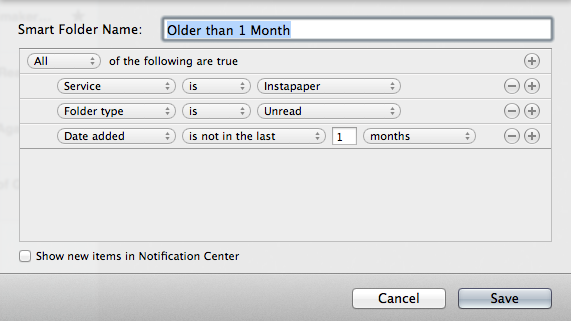
Older than 1 Month
The Unread folder under ReadKit’s Instapaper header is limited to 500 articles at a time (by Instapaper). So at any given time this smart folder had some 470 articles in it. At first I started filing away articles I know I want to revisit soon into folders (which I also reorganized, but you don’t want to hear about that) and spent some time deleting obviously superfluous articles. I even read a few of them as I went through this process. Anything I didn’t know what to do with got archived, which is as simple as selecting and typing A in ReadKit.
Once that was done for the first set of articles, I’d simply reload and do it again for the next set of 500, going all the way back to 2009. Reload, select all, archive, repeat. I did this until my Unread folder was down to only the articles added in the past month. From there it was just a matter of going through the past month’s worth of articles, filing and archiving those I had read and deleting what didn’t belong. Now I’m down to a svelte 17 articles I actually want to read. And I will.
Yesterday I read more long pieces from the Internet than I have in too long a time. It was nice to open Instapaper and be able to quickly pick a worthy piece to read. As a result I’m also more careful about what I put into Instapaper and why. Things I want to read should go to Instapaper; things I need to save go to Pinboard. It sounds simple but for the longest time I used the services interchangeably. Without ReadKit I may not have been able to find a way to clean up Instapaper and rediscover it.
A few more words on ReadKit itself. Visually it’s a simple, stunning app. I like all of the themes for reading text, and I’m glad that I’m able to pick which typeface my articles appear in. It’s just customizable enough, but not to the point of being overwhelming. I loaded up my Pinboard account, but personally I prefer the Pinboard site to any native tools. However, I may find better uses for it in the near future. One other nice touch in ReadKit is its ability to “save and restore” your reading position. This sort of works with Instapaper’s own progress syncing, though mostly it’s useful for retaining your place while navigating away from an article. It’s an optional feature but a pleasant one.
One request would be to add some form of word count to the app. I was hoping there would be a way to set a word count threshold for Smart Folders so I could sift out the really long reads from the short ones. When I sit down to pick which article I read, article length is the first metric I check, cleverly made visible in Instapaper’s iOS app by a series of dots below the headline. Perhaps in time this will be added, but of course it would be a luxury.
ReadKit 2 is $4.99 on the Mac App Store.1 Go get it. You won’t be sorry.
-
Affiliate link. I thank you in advance. ↩︎
Baseball’s First Pitch Loses Its Exclusivity ⇒
Andrew Keh for the New York Times:
In a sport that clings to its traditions — from managers wearing uniforms to the playing of “Take Me Out to the Ball Game” during the seventh-inning stretch — one time-honored feature at the ballpark has taken an absurd turn, at least for the game’s purists: the ceremonial first pitch.
I’m torn. The first pitch is a time-honored tradition that is being sullied by corporate sponsorship. On the other hand, the Phillie Phanatic’s Hatfield hot dog launcher holds a special place in my heart and has nothing to do with the game either.
Death By Lens Flare ⇒
Kyle Hill over at Scientific American’s Overthinking It blog breaks down what would happen if viewers drank a teaspoon of alcohol every time a lens flare appears on screen in Star Trek Into Darkness:
With so many lens flares, you’d be sipping on your drink about eight times per minute. At this rate, neither men nor women would make it out alive. But because body weight plays a big role in [blood alcohol content], men would at least make it past the first act before their breathing fails. Men make it 85 minutes before trekking into darkness while women only make it about half that. That’s what happens when you beam over five liters of alcohol into your system.
OmniFocus 2 Theme for OmniFocus 1 ⇒
Jon de la Vega on his Github project page:
I like the look of Omnifocus 2 but it’s not ready for everyday use so I decided to make a theme for OF1 with the renewed look.
I’ve had access to the OmniFocus 2 “private test” for about a month, but right now it’s not usable on a daily basis (for me, at least). This theme really dresses OF1 up like OF2 in a way that is, surprisingly, nice. If you want to get a feel for where Omni is taking the design but retain the functionality you’re used to, this theme works quite nicely.
The Thoreau Poison ⇒
Caleb Crain at the New Yorker’s Page-Turner blog:
…leaving the theatre after “Upstream Color,” I felt reasonably confident that I understood what had happened, plotwise. “But what’s it about?” my husband asked. I felt much less sure about that, but as I thought it over in the days that followed, and as I pulled a few transcendentalist classics off the shelf, I began to wonder if I’d been watching a movie by the premier Thoreauvian of our time.
This is easily the best piece of writing on Shane Carruth’s film yet.
Solving Equation of a Hit Film Script, With Data ⇒
Brooks Barnes, reporting for the New York Times, on Vinny Bruzzese’s screenplay data-crunching company:
For as much as $20,000 per script, Mr. Bruzzese and a team of analysts compare the story structure and genre of a draft script with those of released movies, looking for clues to box-office success.
Used to be you got into the movie business to make movies.
Top 10 Films About Neighbors ⇒
Here’s a fun list I put together for GOOD. Spoiler: Rear Window took the top honor (duh).
Slugline [Mac App Store Link] ⇒
This morning Stu Maschwitz announced Slugline, a Fountain screenwriting app. Slugline (check out the official site) has been in development almost since the earliest rumblings of Fountain. I have had the great privilege of using it throughout the beta, watching it grow into the powerful app it is today.
Slugline allows you to write in Fountain while making your script look like a formatted screenplay. It’s like Final Draft without all the headaches. It’s magic. And since your documents are always in plain text, you can take them with you anywhere.
I’ll be publishing a more detailed piece soon, so stay tuned. Slugline is on the Mac App Store For $39.99. You could buy it six times over and still be short of buying Final Draft. Go get it1 and write a movie.
{::nomarkdown}
Welcome to Slugline from Slugline on Vimeo.
{:/nomarkdown}-
That’s an affiliate link, as is the headline of this article. Using it supports this site. I should also disclose that I was given a copy of Slugline in advance of its release. ↩︎
Marked 1.4.1 in the App Store ⇒
Brett Terpstra on the new update to his app, Marked:
You’ll also notice that Marked now shows up in “Open in” menus throughout the system. This will be handy with Ulysses 3, especially when working with “external sources.”
A few people noted this issue on Twitter and on my post detailing a Ulysses to Marked workflow. All should be well now.
If you write in Markdown you should own Marked. If you haven’t already, go grab a copy.1
-
Affiliate link. I thank you in advance. ↩︎
5 Texas Breweries We Hope Come To NYC ⇒
Nell Casey for Gothamist:
Perhaps because so many German immigrants settled in the state in the mid-19th century, Texas has a strong craft brewing scene and relationship to beer. Here are some of our favorite breweries we wish would distribute to New York City…
Suck it, NYC! Great list.